Showing posts with label Technologie. Show all posts

Thursday, November 20, 2008

World Wind Multitouch Wall in Public Underground

Johannes Schöning from the University of Muenster Institute for Geoinformatics, Germany has posted a video showing their multitouch wall version of World Wind Java installed in a public place.


During a technology exhibit we installed a FTIR based large scale multi-touch screen in pedestrian underway in the city of Münster, Germany. In this video we show a few impressions of this project called: "Hightech Underground".

Build your own multi-touch screen - see link below

See this previous post about the same multitouch World Wind project - May 2008.

> YouTube video here.
> Some pictures of the event.
> Build your own multitouch screen with the MultiTouch Bootcamp.
> Improving interaction with virtual globes through spatial thinking: helping users ask "why?", a research paper from the same author.

Tuesday, November 18, 2008

CNES e-CORCE: Earth At One Meter Every Week

The French Centre National d'Etudes Spatiales (CNES) has come up with an innovative satellite remote-sensing system capable of generating a high-resolution picture of Earth on the Web, refreshed every week. Four patents have already been filed for the concept, called e-CORCE that could start broadcasting on the Internet by 2014.

CNES e-CORCE
Although still on paper, the plan is to use a constellation of thirteen low cost micro satellites capable of imaging the globe at a resolution of one meter. Each of these orbiting webcams would use a smart "spycho-visual" compression scheme to drastically reduce the amount of data to be transmitted in real time to a grid of fifty ground stations connected to the Internet.

Whether this particular project will become a reality or not, it shows what the current trends in micro satellites technologies, data compression and grid computing will allow in the near future. How privacy groups, military and security agencies around the world will react to it remains to be seen though.

Wednesday, August 6, 2008

Wii Remote and World Wind Java

Fabrizio Giudici, a World Wind Java early adopter, reports yet again a Wii remote related demo involving the NASA SDK. The project called Montenav demonstrated by Gianpaolo Melis at the JUG Genova uses the Nintendo hardware to control the WW globe using gestures.


In the above video the red and green dots are the two hands being tracked simultaneously. Gianpaolo Melis used IR leds attached to his hands to communicate his gestures to a fixed Wii remote.

For more details see Fabrizio Giudici web log.

Last January i reported another project involving Wiimotes and World Wind - the .net version. Recently, j_c_maglio, a WWJ forum member mentioned working on a related project.

Monday, January 7, 2008

Control WorldWind by moving your head around

Following in the steps of Johnny Chung Lee from Carnegie Mellon University, WorldWind developer Nigel Tzeng from the John Hopkins Applied Physics Lab, made a very nice demo of a 'desktop virtual reality display' for WorldWind .Net - using a Wii remote:


See this WorldWind forum thread for discussion, and Johnny Lee Wiimote Desktop VR faq on his blog.

Sunday, November 11, 2007

WMS Layers on iPod Touch

Almost two weeks since i got the IPT and so little time to hack into it... I still havent managed to install the iPhone applications but i got it 'jailbreaked' and have a Finder now with a couple additional icons. However it will probably not last long with the coming firmware updates...

It is quite exciting to see that the little tablet is a 400Mz OS X platform. There are already many sites dedicated to using the touch or the phone as an 'open', mobile, computing device and many applications are coming.

Blue Marble Next Generation on iPod Touch
Actually, the easiest way to make an application for these device is to use html and javascript with Mobile Safari. These are so called 'web applications'.

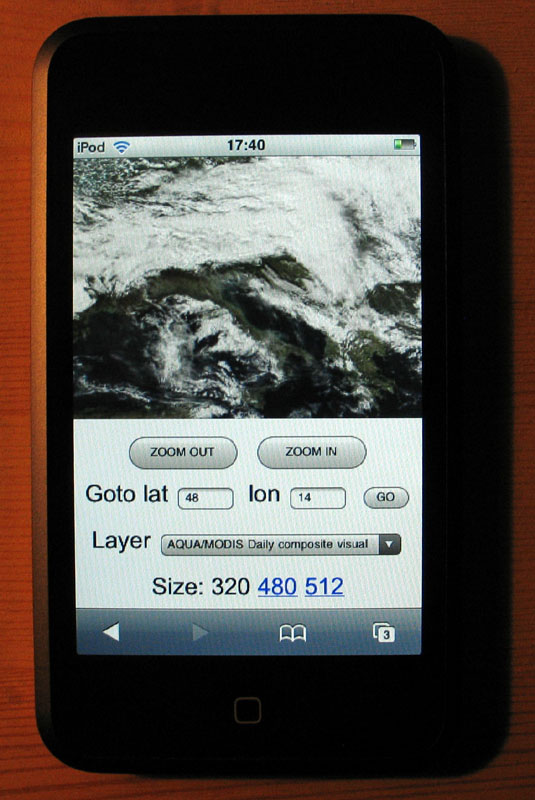
So back to Notepad and some good old school javascript, i put together a very simple mobile WMS browser (updated november 16).

This is not World Wind but at least you can browse a couple WMS layers i grabbed from the WMSLayerManager example in the WW Java SDK: Blue Marble Next Generation (june 2004), Blue Marble 'classic', Landsat7 I3, Global mosaic 15m visual, Terra/Aqua daily shots and a few others (including France BRGM geology and USGS layers).

Have a look at the source - its all contained in one page and it is very easy to add more layers. Feel free to copy, edit, reuse and abuse ;)

Tapping (or clicking) on the edges or corners of the tile will have you move sideways or in diagonal. Tapping inside the image will zoom on the corresponding latitude and longitude.

Some controls at the bottom let you zoom out, goto a specified latitude and longitude and select different layers. Still a bit crude, but usable... and you can put (and share) bookmarks anytime.

The page has to be hosted somewhere though. I wonder if it could simply be transfered in the IPT and opened locally with Mobile Safari. Probably easy to do if you know a bit OS X or Linux...

Tuesday, October 30, 2007

WWJ on iPod Touch: when will it be ?

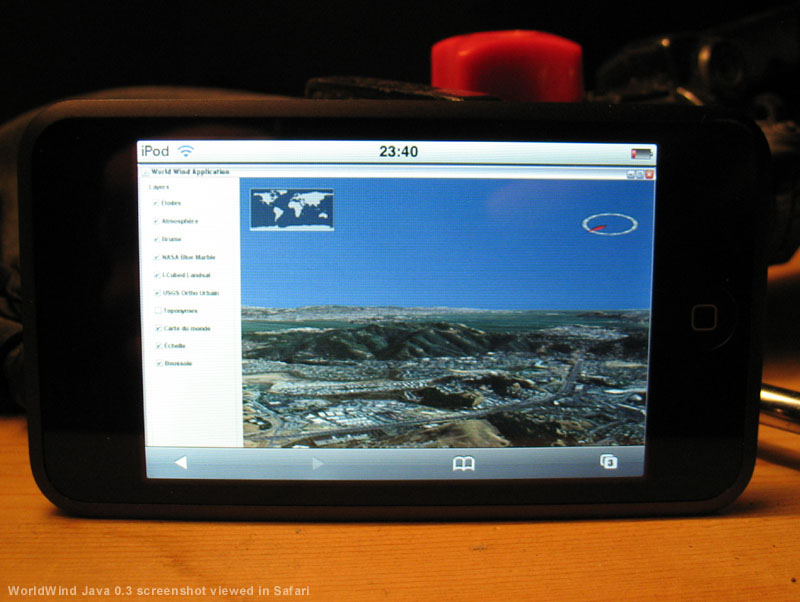
OK, i admit, i bought one this afternoon, and i cannot resist to show off a mock up of WorldWind Java on the iPod Touch beautiful screen:


It seems inevitable that Java will run one day on this device, considering the constant efforts from Sun to provide virtual machines and API for the increasingly powerful mobile gadgets we have these days. Now to get Open GL and JOGL decently running will be another challenge...

Monday, May 14, 2007

World Wind Java is finally out

Its not a girl, its not a boy... it is a SDK, a pre-alpha version named 'Early Access 0.2'.


The long awaited - and a bit mysterious, World Wind Java from Nasa Learning Technologies has finally been unveiled (some demo video) at the Java One Conference 2007, last week in San Francisco.

Although it comes with several limited demo, it is not intended to become a full featured application like the actual World Wind, but a tool kit for developers to build "100s of World Winds" - as Tom Gaskins, WWJ Technical Manager states it on the WWJ FAQ.

One of the unique features of WWJ is that it will be able to run on any computer supporting Java - with a bit of muscles though, from a local install or right off the Web, using Sun's Java Web Start technology. Words of applets embedded in a web page have been floating around... but i have not seen any so far.

This geospatial, 3D interplanetary exploration tool, giving access to global, detailed, images and informations about our planet and beyond... can run on most computers on Earth in a way or an other, and probably just now if connected to the Internet. Whether it could be uploaded to the Mars rovers or onboard future missions as not been said yet.

However, as of today, the SDK is still a work in progress and wil continue to evolve until a stable version emerge - "No date for a stable release has been established yet" says WWJ Technical Manager - after a year in development and Sun Microsystem involvement.

The release has drown a fresh crowd of enthusiastic World Wind users on the newly started WWJ forum. Over last weekend some have already posted startup instructions and tips for developers using Eclipse or Netbean IDE. All useful information is gathered by the active WW community on the World Wind Central Wiki - in a constant effort to balance the chronic lack of documentation from NLT.

The full potential and impact of this new and promising NASA software is yet to be discovered as many start to try out ways to use it in their own projects and visions.

Tuesday, April 24, 2007

OLPC - XO-1 La petite machine verte

Recement, j'ai eu la chance d'avoir entre les mains un des premiers modèles de test de l'OLPC (One Laptop Per Child).


Issu d'un projet à but non lucratif, le X0-1 est une curieuse petite machine verte destinée à l'éducation des 'enfants du monde' et dont le coût de production ne devrait pas dépasser $100 US. Elles seront produites en grandes quantités et seront distribuées uniquement par l'intermédiaires de gouvernements ou d'organismes. Les premières pourrait êtres livrées à la fin 2007.

Cet ordinateur conçu pour des enfants a la forme et les dimensions d'un jouet - bien qu'un peu plus lourd (env. 1,5 Kg). L'écran s'ouvre comme celui d'un portable pour révéler le clavier miniature et souple ainsi qu'un pavé tactile de pointage. Il peut aussi pivoter puis se rabatre pour former une 'tablette' ou un livre électronique.

Pensé avec un souci d'économie d'énergie et de coût réduit, il est doté d'une puissance modeste mais trés honorable lorsqu'on ne la gaspille pas. Il ne comporte aucune piéce mobile (disque, disquette, CD...), mais plusieurs ports USB, une caméra numérique et un micro. Il est surtout équipé d'une interface pour réseaux sans fil qui lui permet de se connecter spontanement avec les autres OLPC à proximité pour former un réseau 'maillé' reliant tout les enfants.

La netteté de l'affichage couleur est particulièrement étonnante avec ses 200 points par pouces - presque autant qu'une revue imprimée. Il peut aussi fonctionner en noir et blanc à la lumière du jour en minimisant la consommation d'énergie.


Le logiciel basé sur Linux est libre et les formats de fichiers utilisés par les programmes sont ouverts. Pas de restrictions donc quant à leur éventuelles modifications et améliorations qui seront alors partagées et profiteront à tous sans coûts supplementaires.

Bien qu'ayant beaucoup des attributs d'un ordinateur portable 'pour adulte' il ne faut pas se méprendre sur sa nature. Sa vocation est d'être un outils d'éducation permetant des activités simples comme lire, écrire, communiquer ou jouer toujours dans un esprit de collaboration et d'échange et non pas d'utiliser des logiciels de bureau complexes, des bases de données ou le dernier jeux en 3D.

Le prototype que j'ai pu utiliser ne disposait que d'une partie des composants logiciels qui sont en cours de développement et je n'ai fait qu'effleurer la surface. L'interface originale Sugar est un concept assez déroutant au premier contact - pour un adulte utilisant des ordinateurs depuis des années.


Les notions de bureau, de programmes, de dossiers et de fichiers laissent la place à celles d'activités, de participants et de journal. Toutes les activitées sont conçues pour tirer profit de la communication spontanée entre les machines et permettent la collaboration de plusieurs participants. Ce qui est fait ou produit au cours d'une activités peut être 'sauvé' ou enregistré dans un journal auquel l'enfant peut revenir à tout moment pour retrouver ce qu'il a fait et avec qui.

Parmis les activités prévues : lecture de documents (texte ou autres), navigation internet (basé sur le code utilisé par Mozilla Firefox), prise de photos (avec la caméra intégrée), composition de musique, écriture, dessin, communication instantanée texte, audio et vidéo...

En somme, une machine extraordinaire issue d'un projet extraordinaire initié par Nicholas Negroponte fondateur du Media Lab au MIT.